
![]() |
|
| Discuss Amibroker : Price Chart in two TimeFrames at the AmiBroker within the Traderji.com - Discussion forum for Stocks Commodities & Forex; I want to know what are the ways in which two different Time Frame charts ... |
|
|||||||
| Notices |
![]() |
|
|
Thread Tools |
| Sponsored Links |
|
#1
|
|||
|
|||
|
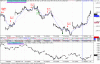
I want to know what are the ways in which two different Time Frame charts can be displayed in Amibroker.
Being a student of Saint, I need to keep track of pivots in two different timeframe... ![]() 1) Keep on pressing Ctrl+5 and Ctrl+0 for 5min and hourly charts. and for 30 min .. no hot key ![]() 2) Keep two different chart window open with different timeframes. I found both these methods annoying, If there are any more methods please educate me. Finally I worked with Amibroker and came up with the following AFL. Nothing Fancy .. just used a different TimeFrame...But it works. If I have reinvented the wheel... please ignore.. if not then enjoy the power of Amibroker... have two timeframes in one screen. /////////////AFL////////////////////// _SECTION_BEGIN("HigherTFCandle"); timeFrame = 60 * Param("Time",30,9,200,1); TimeFrameSet(timeFrame); _N(Title = StrFormat("{{NAME}} - "+ Interval(2) + ", " + Date() + " - Open %g, Hi %g, Lo %g, Close %g (%.1f%%) {{VALUES}}", O, H, L, C, SelectedValue( ROC( C, 1 ) ) )); Plot( C, "Close", ParamColor("Color", colorBlack ), styleNoTitle | ParamStyle("Style") | GetPriceStyle() ); TimeFrameRestore(); _SECTION_END(); |
|
#2
|
|||
|
|||
|
Other methods
1. Linked Chart Creates linked chart window based on current template and active chart. Linked windows use the same symbol selection, so if you change the selected symbol for one of them, the other one will synchronize automatically. Linked windows can have DIFFERENT viewing time frame selected. Simply activate the window and select desired interval from View menu for one window, then switch to the other one and select different interval for it. This option allows you to select different time frame or indicators' set in each window and easily move through the database. 2. You can display the intraday buttons with differnet intraday time frames and just click on the button with required time 3. Right click on the intraday chart and select the intraday time Regards ken |
|
#3
|
|||
|
|||
|
Ken,
Thanks a lot, Linked Charts are great. points 2 and 3, I know... just wanted to get both charts.. without me clicking anything extra..![]() Regards |
|
#4
|
|||
|
|||
|
Ken,
Linked Charts are great and useful. Thanks a lot. Regards |
|
#5
|
|||
|
|||
|
supplement to kenneth's suggestion...
you can drag this linked chart to dual monitor(AB V5.02). if you want a full view of both timeframes. |
|
#6
|
|||
|
|||
|
Quote:
good job !!!!!!!!!!!!!!!! Please notice the time difference between two charts with diff time frame. I have attached the chart here and please explain me why the difference. please note that the chart in the lower pane is derived from the code given by dhakkan. The upper pen chart is a simple 15 min chart. Thanx in advance Debdulal Kolkata |
|
#7
|
|||
|
|||
|
Quote:
Please do the following first : In the lower window, right click and in parameters on the Tab "Axis and Grid" - select NO for "show date axis?". Reason - the dates are for the timeframe you selected in amibroker .. in this case 15min, and not for hourly. Lower pane .. if its in a different timeframe as in this case hourly, so it will have 4 - 15min bar in one bar to make it hourly. Hence time will be different in the lower pane at the same position, its compressed by factor of 4 in this case. You will have to match time from the right end, ( Or find a way to make the lower candles thicker to occupy place for 4 bars above). Hope this clarifies. take care .. ( and dont thank in advance, it shows you wont be coming back )
|
|
#8
|
|||
|
|||
|
Dhakkan
Thank you very much for the explanation. Advance also indicates something is due.And now its time to say you Thanx again. hahahhha. have a nice week end. |
| Sponsored Links |
|
|
![]() |
| Bookmarks |
| Thread Tools | |
|
|
Indemnity, Disclaimer & Disclosure
Notice:
• By visiting Traderji.com you indicate your acceptance of our Forum
Rules Disclaimer & Disclosure and indemnify Traderji.com, its
associates and related parties of all claims howsoever resulting from
the usage of the forum.
• Disclaimer: Trading or investing in stocks & commodities
is a high risk activity. Any action you choose to take in the markets
is totally your own responsibility. Traderji.com will not be liable for
any, direct or indirect, consequential or incidental damages or loss arising out of the use of this information.
• Disclosure: The information in this forum is neither an offer to sell nor solicitation to buy any of the securities mentioned herein.
The writers may or may not be trading in the securities mentioned.
• All names or products mentioned are trademarks or registered trademarks of their respective owners.
General Content Disclaimer Notice:
In light of our policy of encouraging candid, open exchanges of views and the rapid distribution of information originating from many sources, Traderji.com cannot determine the accuracy of information that may be uploaded to the forum. Opinions, advice and all other information expressed by participants in discussions are those of the author. You rely on such information at your own risk. You are urged to seek professional advice for specific, individual situations and not rely solely on advice or opinions given in the discussions. Since Traderji.com is an open and free discussion forum, any comments made by members of this forum in their posts reflect their own views and not of the owner or administrator of Traderji.com. Thus the owner/administrator indemnify themselves of all claims whatsoever and will not be liable or responsible for any members comments/views in this forum Traderji.com. If you find any objectionable or offensive posts made by members of this forum which you would like to bring to our notice for removal then please Contact Us.